
AutoCount Integration
Stop Keying Supplier Invoices Into AutoCount.
BalanceNow reads your clients’ supplier documents — PDFs, phone photos, even handwritten bills — and turns them into AutoCount-ready entries. AI prepares, your accountant approves, AutoCount receives. Nothing enters the books until a person approves it.
“50 invoices — 5 minutes, settle.” by Managing Partner, KL accounting firm
AutoCount Cloud
Direct API Integration
- Your accountant reviews and approves the prepared entries
- BalanceNow authenticates with the AutoCount Cloud API securely
- AP entry posts directly to the client ledger
- Sync confirmed — proof generated, source document attached
AutoCount Desktop
One-click direct posting
- Your accountant reviews and approves the prepared entries
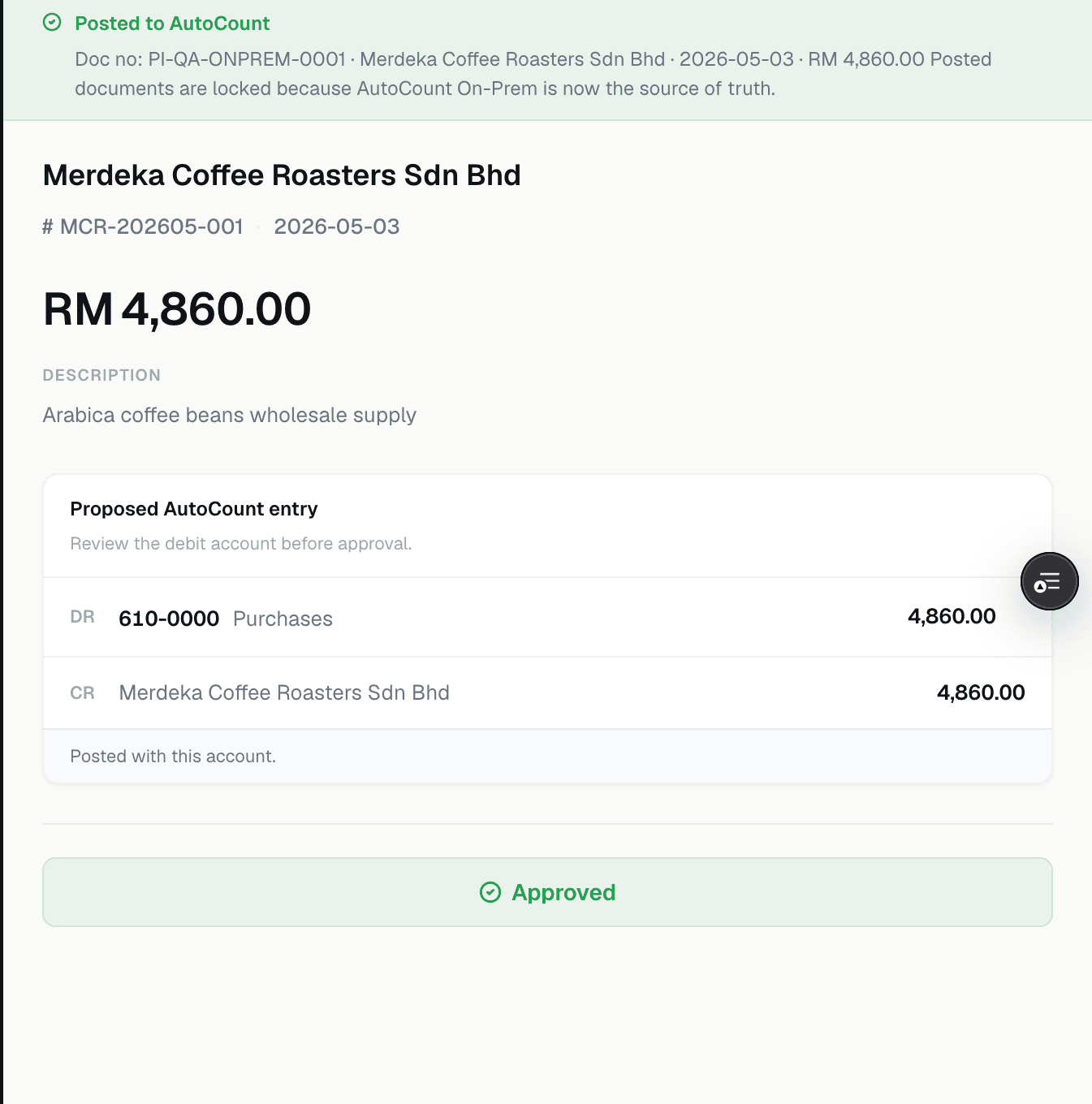
- One click — posted straight into your on-premise AutoCount book
- No exporting, no importing, no re-keying. First in Malaysia
- Prefer full manual control? Import-ready Excel, anytime — we touch nothing
On the export path, BalanceNow makes no direct change to your AutoCount data — you stay in full control of the import.
How the one-time setup works, step by step: see the full setup guide.
Real Product, Real Proof
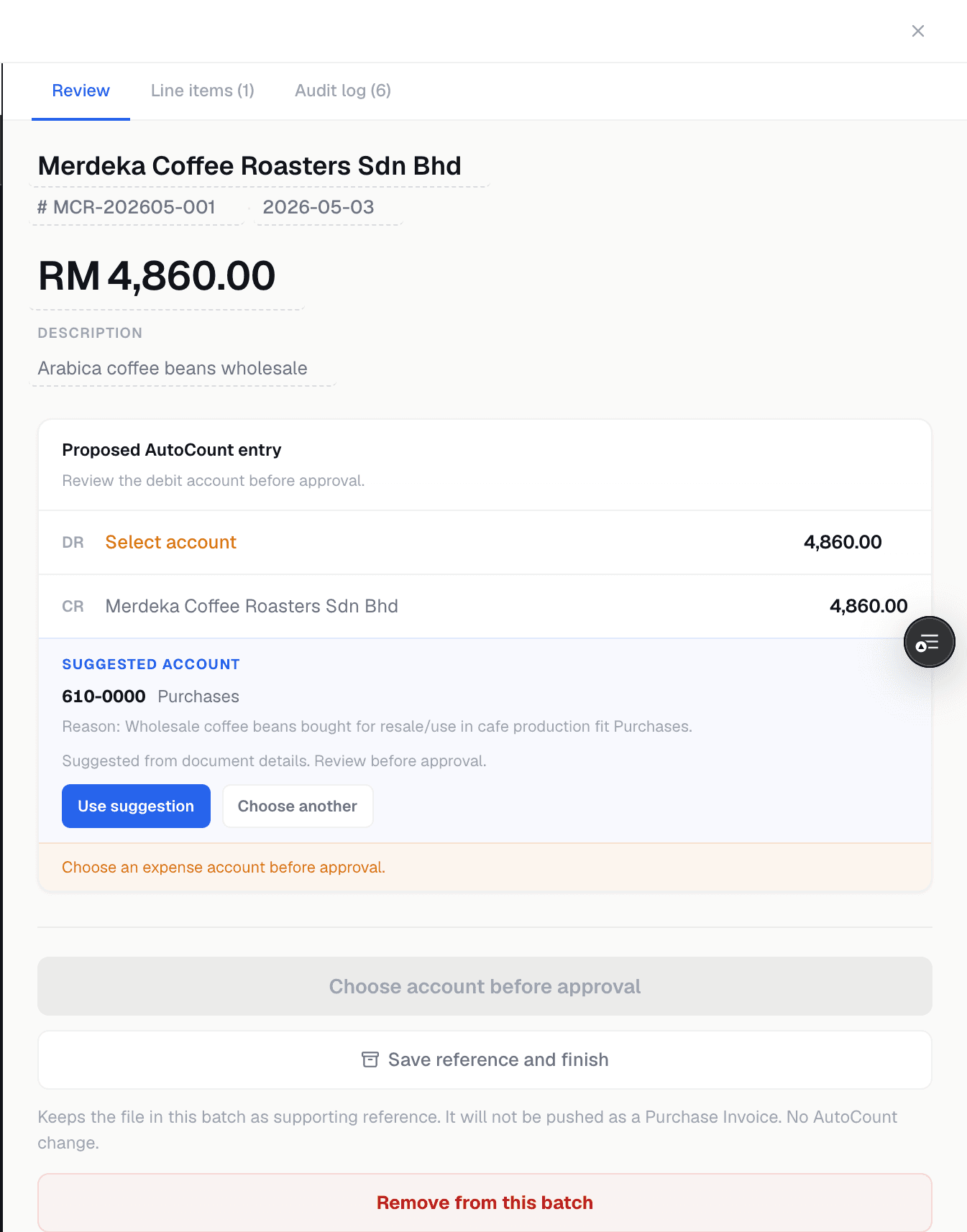
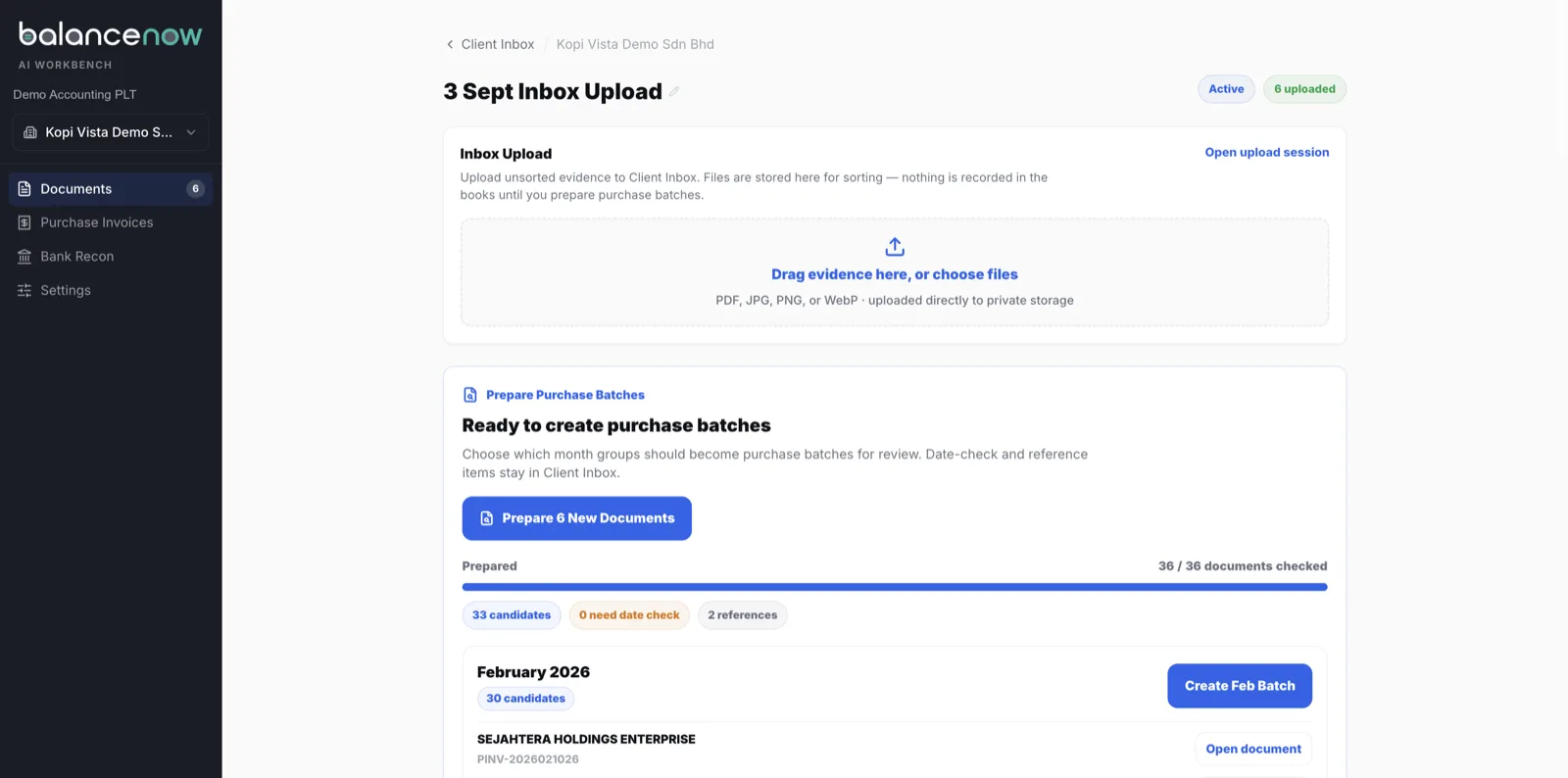
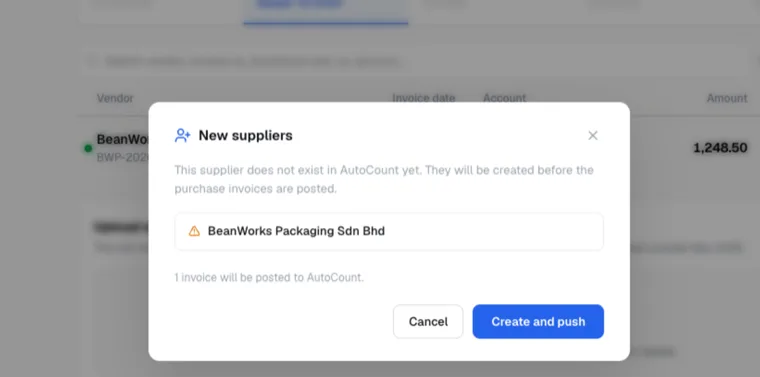
This is what your accountant actually sees
Demo data, real screens — the same two moments you'll see in your own demo.
Watch It Happen
Two minutes of the real thing
The one-time setup, and an approved invoice posting with one click.
Before Anyone Approves
What the AI prepares for your team
Juniors stop typing and start checking. Seniors check the accounting, not the typing.
Every line extracted
Supplier, date, invoice number, amounts, line items — even from phone photos and handwritten bills.
Accounts suggested with reasons
"LED lights → Lighting purchases." A reason you can read, not a black box.
Creditors matched, not duplicated
Matched against your existing creditor list with name variations detected; genuinely new suppliers created and classified.
Problems stopped at the door
Duplicate invoices, wrong-month documents and non-invoices flagged before they touch the books.
Habits remembered per client
Each client's account habits are remembered — nothing walks out when staff resign.
Approval gate, always
No auto-approve, by design. Accountants carry the liability, so accountants keep the final say.
No Call, No Form
Test us with 10 real invoices.
WhatsApp us 10 invoices from any client. Messy ones welcome. We run them through BalanceNow and send back the entries the same business day.
WhatsApp 10 invoices nowFAQ
AutoCount questions, answered straight
- AutoCount already has scanning — why add BalanceNow?
- Scan features built into accounting software read one document at a time and fill in fields. BalanceNow is the batch workflow that runs before AutoCount: upload a whole month of client documents at one go, duplicates and wrong documents are flagged at the door, missing suppliers are created and classified, account habits are remembered client by client, and everything flows through one approval queue. The test is not "can it read an invoice" — it is how fast a whole pile is keyed, checked and posted.
- Can BalanceNow create suppliers in AutoCount?
- Yes. Each invoice is matched against your existing creditor list, including common name variations, so you do not end up with duplicate creditors. If the supplier genuinely does not exist yet, BalanceNow creates it and classifies it correctly — and your accountant sees that before anything is approved.
- We use AutoCount Desktop (on-premise), not Cloud. Does this still work?
- Yes — and this is where BalanceNow is different. Approved entries post straight into your on-premise AutoCount book with one click: no exporting, no importing, no re-keying. We are the first in Malaysia to do this. Setup is a one-time guided install on your machine, done within a day. Prefer to stay fully hands-on? Download an Excel file in the AutoCount import schema and run the import yourself — on that path, BalanceNow makes no direct change to your AutoCount data.
- Can it read handwritten bills and WhatsApp photos?
- If a person can read it, BalanceNow can key it in — including handwritten bills and photos sent over WhatsApp. Anything unclear is flagged for your review instead of being guessed at quietly.
- What happens when the auditor asks for supporting documents?
- The source document is attached to every entry. Click an entry and the original invoice is right beside it — one click, no digging through carton boxes, with documents kept in line with the 7-year record-keeping requirement (LHDN).
Comparing with the built-in scanner? Read our plain-language guide to AutoCount AI Smart Scan — what it does, what it costs, and where a firm needs more.
Get Started
Bring Your Toughest Client's File.
20 minutes, on your real documents — watch them get keyed in, checked, and made ready to post into AutoCount, live in front of you.
Doing imports by hand today? Read the Excel import guide. Also using SQL Account for some clients? See the SQL Accounting integration.
Last reviewed 20 July 2026 · BalanceNow team · Questions? hello@balancenow.com.my