
Two Days of Key-In. Now
Five Minutes of Checking.
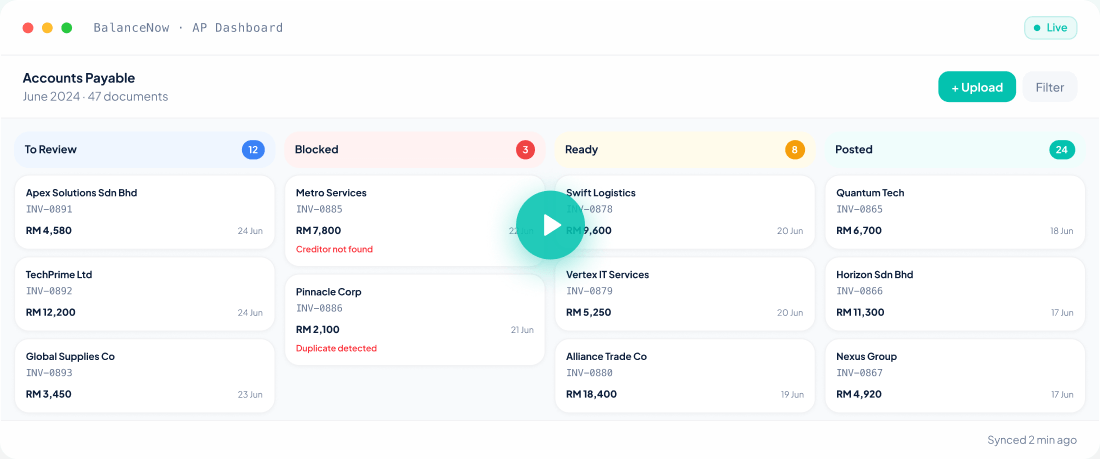
Upload all the docs, even the messy handwritten ones. AI keys everything in. You check. You approve. It posts into AutoCount or SQL. Proof attached. Nothing goes into the books until you approve.
“50 invoices — 5 minutes, settle.” by Managing Partner, KL accounting firm
Early partner: first 30 firms · unlimited documents
Works with the software your clients already use
How It Works
From Boxes of Documents to Posted Entries — 5 Steps
Two days of staff work, settled before your coffee gets cold.
Connect to AutoCount On-Prem
For AutoCount desktop users, simply connect once with our on-prem setup. Your client books are now synced — no more back and forth book updates.
Client Sends Documents with Magic Link
Send a secure upload link to your clients' WhatsApp. Clients can submit PDFs, photos or handwritten documents easily — no registration or login needed.
Sort All Documents with Client Inbox
Client documents are with you? No problem. Upload files or capture photos into one inbox, and BalanceNow organises them into monthly batches.
AI Keys-In & Suggests
BalanceNow reads the document, extracts the details, and suggests the right account. You review and approve. AI remembers your choices for next time.
Posted — with proof attached
Approved entries can be posted to AutoCount On-Prem, AutoCount Cloud, SQL Account, or exported locally. Need proof for auditing? Just click any entry and the source document is right beside it.
See it on your own documents
Manual Key-In vs Basic Scan Tools vs BalanceNow
Three ways to clear a pile of invoices. Only one settles before lunch.
Reads every line, even handwriting
- Manual Key-In
- You squint and type
- Basic Scan Tool
- Some do
- BalanceNow
- If a person can read it, it can
Duplicates & wrong documents
- Manual Key-In
- Found at month-end
- Basic Scan Tool
- Not its job
- BalanceNow
- Stopped at the door
Creates the supplier in your software
- Manual Key-In
- You key it in
- Basic Scan Tool
- No
- BalanceNow
- Created for you, classified correctly
Posts the entry into AutoCount / SQL
- Manual Key-In
- You key it in
- Basic Scan Tool
- Gives you a file, you continue
- BalanceNow
- Posted directly — or a ready-to-import file for desktop
Proof when the auditor asks
- Manual Key-In
- Dig the store room
- Basic Scan Tool
- Screenshots, if lucky
- BalanceNow
- Source document attached to every entry, kept 7 years (LHDN)
Client account habits
- Manual Key-In
- In the senior's head
- Basic Scan Tool
- Reset every time
- BalanceNow
- Remembered, client by client
When staff resign
- Manual Key-In
- Knowledge walks out
- Basic Scan Tool
- Retrain from zero
- BalanceNow
- Nothing is lost
Who approves before it enters the books?
- Manual Key-In
- You (after typing everything)
- Basic Scan Tool
- Depends
- BalanceNow
- Always you — one click, after AI prepares everything
Integration
One Workbench. Every Client.
Cloud posts through the official API. On-premise posts with one click — no export-import dance. We are the first in Malaysia to do it. Your staff work the same way for both.
AutoCount Cloud
Direct API Integration
- Your accountant reviews and approves the invoice
- Authenticates with AutoCount Cloud API securely
- Posts AP entry directly to the client ledger
- Sync confirmed — proof generated instantly
AutoCount & SQL On-Premise
One-click direct posting
- Your accountant reviews and approves the invoice
- One click — posted straight into your on-premise AutoCount or SQL book
- No exporting, no importing, no re-keying
- Proof attached — settle. Prefer files? Excel export is always there
One workbench for everything that happens before it goes into the books.
Today
Purchase
Also live
Receivables · Bank reconciliation (AutoCount Cloud)

“One client's documents used to take my staff two full days to key in. Now it's five minutes, and I just check through and approve.”
Managing Partner, Accounting Firm
Kuala Lumpur (early partner)
2 days → 5 min
Per client, per month
No Call, No Form
Test us with 10 real invoices.
WhatsApp us 10 invoices from any client. Messy ones welcome. We run them through BalanceNow and send back the entries the same business day.
WhatsApp 10 invoices nowFAQ
Questions accounting firms actually ask
What happens if the AI gets something wrong?
Nothing enters the books without a person approving it. AI prepares and suggests; your accountant reviews and confirms. Anything doubtful — unclear handwriting, a suspected duplicate, an unfamiliar supplier — is flagged and waits for a human decision. There is no auto-approve, by design.
Do we need to change our accounting software?
No. BalanceNow is an AI bookkeeping workbench that sits before the ledger. It posts into AutoCount Cloud, posts straight into on-premise AutoCount and SQL Accounting with one click — first in Malaysia, no export-import needed — and exports import-ready files for everything else. Your clients keep the software they already use.
Our software already has a scan feature. How is this different?
Scan features read one document at a time and fill in fields. BalanceNow is the batch data-entry workflow for accounting firms: a whole month of client documents at one go, duplicates stopped at the door, suppliers matched and created, account habits remembered client by client, one approval queue for everything.
Will this replace our junior staff?
No — it changes what they spend time on. Instead of typing vendor, date, invoice number, amount and account from scratch, juniors compare prepared entries and fix exceptions, and seniors review faster. The firm handles more clients without adding the same key-in workload.
How do client documents get in?
The same way they arrive today — PDFs, phone photos, WhatsApp images, scanned bundles. Your team uploads them in batches of 30 at a time; no sorting, renaming or pre-cleaning needed. Mixed and multi-invoice files are split automatically, and non-invoices are flagged straight away.
Who can see our clients’ data?
Only your firm. Every firm’s workspace is isolated, source documents are stored for audit support in line with the 7-year record-keeping requirement (LHDN), and documents are used to prepare your entries — nothing else. Questions about data handling: hello@balancenow.com.my.
Software-specific questions: AutoCount · SQL Accounting
Get Started Today
Bring Your Toughest Client's File.
20 minutes, on your real documents — invoices, receipts, even the handwritten ones. Watch them get keyed in, checked, and made ready to post, live in front of you.
Early partner: First 30 firms · Unlimited documents · Set up within a day