
Setup Guide
Set Up One-Click Posting Into On-Premise AutoCount.
A one-time guided setup on the AutoCount machine, done within a day. After that, approved invoices post with one click — no export, no import, no re-keying. First in Malaysia.
At a Glance
The full flow, in seven steps
- Install the BalanceNow desktop agent — a small program installed beside AutoCount — on the AutoCount Windows machine or server.
- Pair it with BalanceNow using a one-time setup code from your settings.
- Detect AutoCount books and import the correct book for the client.
- Review and approve the supplier invoice in BalanceNow.
- Push the approved invoice to AutoCount with one click.
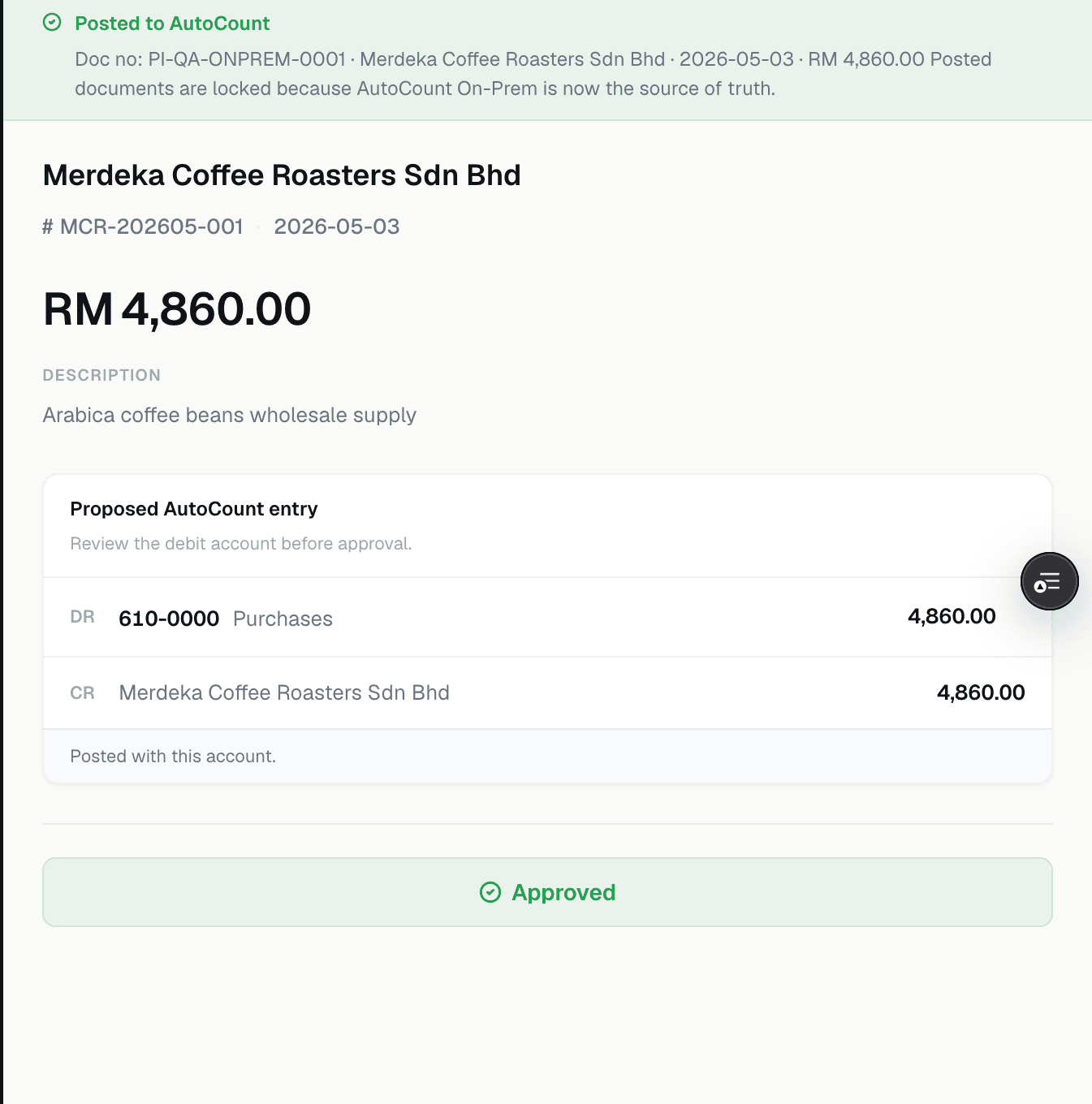
- BalanceNow shows the posted AutoCount PI number — normally within about a minute.
- Verify the PI in AutoCount: A/P → A/P Invoice Entry → Find the PI number.
What setup involves
Guided, on the AutoCount machine
- Install once, on the Windows machine or server that runs AutoCount
- Pair with a one-time setup code from your BalanceNow settings
- Detect the AutoCount books and import the correct one
- Done — one time per server. The next client on the same server skips the install
Installing is one-time per AutoCount server. For another client on the same server, skip the install — just pick or import the correct book.
What pushing looks like
Every month after that
- Your accountant reviews and approves the prepared entries
- One click — Push to AutoCount
- Posted with the AutoCount PI number shown in BalanceNow, normally within about a minute
- Verify anytime in AutoCount: A/P Invoice Entry → Find the PI number
The Proof
What posted looks like
FAQ
Setup questions, answered straight
- Do we install anything on every staff laptop?
- No. The install happens once, on the Windows machine or server that runs AutoCount. Your staff use BalanceNow in the browser as usual.
- How long does setup take?
- It is a one-time guided setup, done within a day — usually much less. Pairing uses a one-time code from your BalanceNow settings, and we guide the whole thing.
- What if the supplier doesn't exist in AutoCount yet?
- BalanceNow creates the creditor first, then posts the purchase invoice. You will see the created creditor before treating the push as complete.
- Can a pushed invoice be double-posted?
- Re-pushing an already posted invoice does not create another purchase invoice. Each approved document gets one AutoCount PI number, shown in BalanceNow as proof.
- What happens if a push fails?
- The document shows a clear failure message in BalanceNow. Fix the issue and retry the push — do not key the invoice manually first, or you may end up with duplicates.
Get Started
Want Us to Walk You Through It?
Book a 20-minute demo — we set up a real flow and post a real document in front of you.
More on the integration: AutoCount integration · how firm data is handled
Last reviewed 21 July 2026 · BalanceNow team · Questions? hello@balancenow.com.my